Choose the plan that fits your needs.

Free

Create and share videos effortlessly with essential recording tools.

$0
/ No credit card required

Get started today

Key features:
Create or upload up to 10 videos
Record up to 30 minutes
Has Castify watermark
Share instantly with a link
Video editing tools
Request & collect limited videos with Submit
Add questions and polls
Teleprompter
Invite up to 4 team members
Control video privacy

Starter

Boost productivity with unlimited videos, editing, and collaboration.

$7
/ user / month, billed annually

$19 when billed monthly

Everything in Free, plus:
Create unlimited videos
Record up to 60 minutes
Remove Castify watermark on new videos
Unlimited viewer analytics
Highlight reels with Submit

Pro

Scale communication with AI-powered workflows and advanced features.

$10
/ user / month, billed annually

$25 when billed monthly

Everything in Starter, plus:
AI video enhancements
Record up to 180 minutes
AI questions
Captions & transcripts
Translations & voiceovers
AI script generator
Request & collect unlimited videos with Submit
Unlimited exports
YouTube for EDU (Education users only)
LMS grade sync
Optional Add-On: Castify Transform
Optional Add-On: Submit AI

Enterprise & EDU

Control and secure all video content across your entire organization.

Custom

Let's talk

Everything in Pro, plus:
Commenting controls
Student restrictions
Admin analytics
YouTube for EDU controls
Dedicated training
Assigned Success Manager
Optional Add-On: Castify Transform
Optional Add-On: Submit AI
Available on Pro & Enterprise/EDU Plans

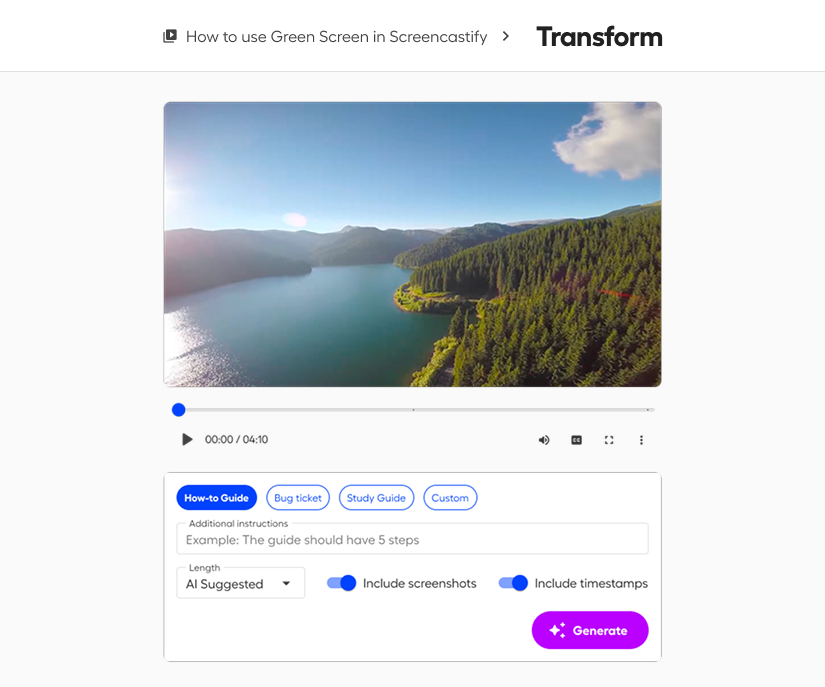
Castify Transform

Turn any video into professional documentation with Castify Transform, your AI-powered content generator. Automatically create how-to guides, bug reports, study materials, and custom documents complete with screenshots, timestamps, and structured formatting. Whether you're building a knowledge base, documenting processes, or creating study resources, you'll go from recording to polished documentation in seconds.
Available on Pro & Enterprise/EDU Plans

Submit AI

Take the busywork out of teaching with Castify Submit AI, your AI-powered assignment manager. Automatically generate assignment instructions, build professional rubrics, suggest grades with clear reasoning, and deliver personalized feedback the moment a learner submits. Whether you're running a classroom, training a team, or managing a full cohort, you'll go from video content to graded, feedback-ready assignments in a fraction of the time.
Features
Expand all
Starter
Buy now

Account Members & Collaboration

Members
Up to 5
Unlimited
Unlimited
Custom
Collaborators
Up to 5
Unlimited
Unlimited
Custom
Viewer Analytics
Limited
Unlimited
Unlimited
Unlimited

Video Recording

Video Limit
10 Videos
Unlimited
Unlimited
Unlimited
Recording Length
30 min per video
60 min per video
180 min per video
Custom
Video Quality
Up to 1080p
Up to 1080p
High-definition up to 4k
Browser Tab recording
Full Screen Recording
Webcam Recording
Drawing Tools & Mouse Emphasis
Blur
Teleprompter
Remove Castify Watermark
AI Script Generator

Video Editing (Castify Edit)

Castify Edit Access
Questions & Polls
Trim & Stitch Videos
Add Text & Blur Boxes
Edit Video by Transcript
Limited
Limited

Sharing & Export Options

Watch Page Sharing
Upload to Google Drive
Video (MP4) Exports
5 Videos
5 Videos
Audio (MP3) Exports
5 Videos
5 Videos
GIF Exports
5 Videos
5 Videos
Export to YouTube
5 Videos
5 Videos

AI Enhancements

Translations (90+ Languages)
5 Videos
5 Videos
Video Transcripts
5 Videos
5 Videos
Captions
5 Videos
5 Videos
AI Dubbing
5 Videos
5 Videos
Titles, Chapters, Descriptions
5 Videos
5 Videos
AI Generated Questions & Polls
5 Videos
5 Videos

Integrations

Google Drive
Gmail & Outlook
LMS Integration: Google Classroom, Canvas, Schoology
Canvas & Schoology Grade Sync

Request Videos (Castify Submit)

Video Submissions per Topic
35 Submissions
35 Submissions
Unlimited
Unlimited
Create Submit Topic Requests
Highlight Reel
Reviewers

Premium Content (EDU Only)

YouTube for EDU
5 Videos
5 Videos
Standards-Aligned Castify Content
5 Videos
5 Videos

With Add-on: Castify Transform

Document Generation
5 Transformations
5 Transformations
100/month
Custom
Pre-Built Document Types
Custom Document Types
Video Watch Page Integration
Export to Google Drive, .docx, .pdf, clipboard

With Add-on: Submit AI

AI Topic Generation
50 Credits
50 Credits
500 Credits/month
Custom
AI Rubrics
50 Credits
50 Credits
500 Credits/month
Custom
AI Coach
50 Credits
50 Credits
500 Credits/month
Custom
AI Grading
50 Credits
50 Credits
500 Credits/month
Custom
AI Summaries & Next Steps
50 Credits
50 Credits
500 Credits/month
Custom
AI Captions, Transcripts & Translations
50 Credits
50 Credits
500 Credits/month
Custom
FREQUENTLY ASKED QUESTIONS

Everything you need to know before getting started.

Do I need to install software to use Screencastify?

Nope. Screencastify runs directly in your browser. No downloads, no hassle.

How long can I use the free version?

Every new user gets to create their first 10 videos for free. You can store, watch, and share those videos as long as you want.

As a free user, is there a way I can get more free videos?

Yes! Free users get 5 bonus videos for each person they invite to join their account - up to 4 invites for a total of 20 bonus videos. Note: If you remove an invited user, you'll lose those 5 bonus videos.

Can teams collaborate on videos?

Yes. Screencastify makes it easy to share, comment, and collaborate on videos so everyone stays aligned and informed. With advanced collaboration permissions, shared folders, and granular user controls, you can ensure each team member has the right access level for their role.

What does the renewal process entail?

Your subscription will automatically renew and we'll charge the payment method on file until you cancel. If you wish to cancel at the end of your term, you can navigate to your account settings to turn off the auto-renewal.

Is Screencastify safe for schools and students?

Absolutely! Screencastify complies with FERPA, COPPA, CSPC, and other key data privacy standards for K-12 environments. We're also SOC 2 Type II certified, ensuring we're maintaining the highest standards of data security.

Does Screencastify accept purchase orders?

Yes, if it's an order of $500 or more. For more information on purchase orders, please visit our help center.

I still have questions!

We have answers! Please visit our help center or reach out to our Sales team for more information.

Ready to improve how you communicate?

Whether you’re teaching, training, or building something new, Screencastify helps you communicate faster, smarter, and with more impact.